Last Updated on October 4, 2024 by Clark Omholt
This is a deliberately pithy and ambiguously worded title. What I really mean, “will Image P3 come to replace Adobe RGB as the preferred working space in image editing tools such as Photoshop?”, but that’s just too long for a title.
Both “Image P3” and “Adobe RGB (1998)” are two of the default RGB working spaces provided by Adobe Photoshop – along with sRGB, Apple RGB (legacy) and Colormatch RGB (pretty much legacy, also). From what I can tell, Image P3 is identical to “Display P3”, a standard promulgated by Apple. And both are similar to DCI-P3, a standard put forth by the Digital Cinema Initiative. For more detail on this topic, see our post entitled DCI-P3 vs Display P3.
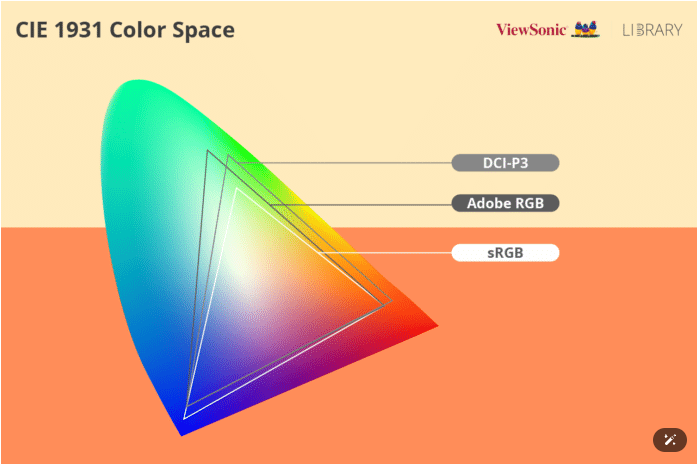
As the image below highlights, both P3 and AdobeRGB have an advantage over Photoshop’s default of sRGB, primarily because they are substantially larger. Since it started being included with Photoshop in 1998, AdobeRGB has been the preferred choice for high-end photographers and other imaging professionals. Many modern printers, along with quality monitors, can display colors outside the sRGB range, so why compromise quality unnecessarily by using a working space that clips your colors?
P3 and AdobeRGB have similarly sized gamuts – to be exact P3 is 2% larger than Adobe RGB and 48% larger than sRGB – with Adobe RGB containing more chroma in Green and P3 more in Red.
But change is afoot.
And this change can be summarized by one word – smartphones. All iPhones since 2016 (iPhone 7) are manufactured to show images in Display P3. Also, recent generation Android phones like the Samsung Galaxy (in Vivid mode) and Google Pixel (in Adaptive mode) enable viewing images in Display P3. In addition, recent generation Apple laptops and monitors are also natively in Display P3. Furthermore, high-end display manufacturers (BenQ, Eizo, espresso, etc) are increasingly making their primaries match the Display P3 gamut. This seems to be an inherent admission that the future of imagery is driven by video.
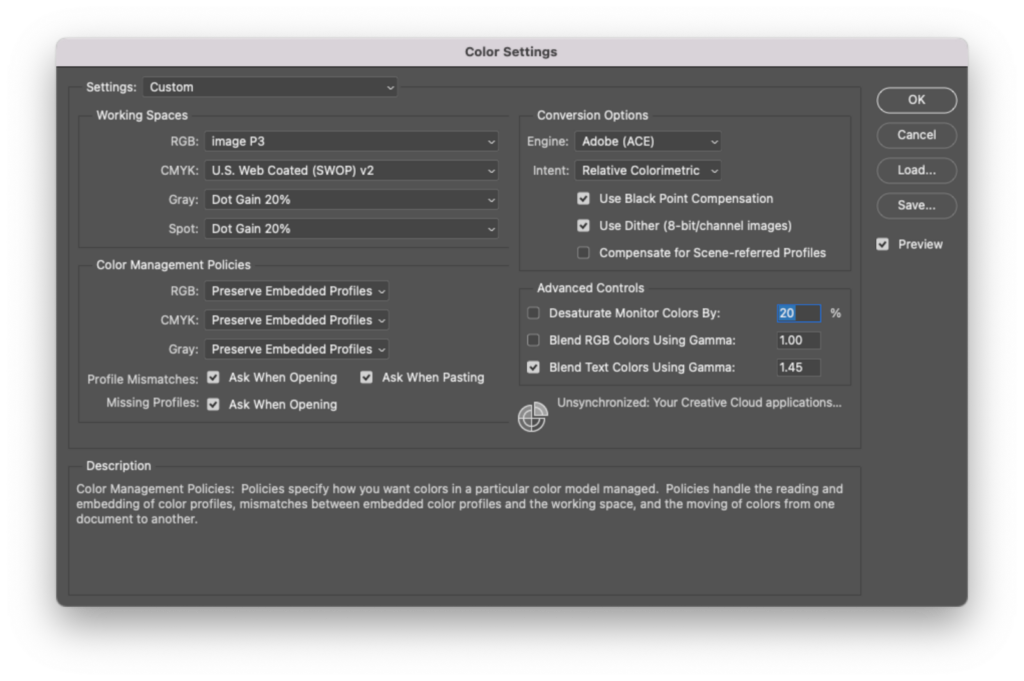
The implications for photographers, designers, and other color professionals is that many, if not most, of your images will end up being viewed on devices that are natively P3. Thus, it’s in your interest to select “Image P3” as your working space in order for your viewers to most closely experience your intention. This can easily be achieved in Photoshop / Illustrator / Bridge by going to Edit/Color Settings and selecting “Image P3” as your RGB working space.
Keep in mind, no matter your working space, a properly calibrated monitor is required to view colors accurately. And TruHu is an easy and cost-effective way to calibrate your monitor.
Lastly, If you are wondering where Rec 2020 fits into all of this, keep your eyes peeled for a future posting.
FAQs About Adobe RGB and Display P3
1. What is Adobe RGB 1998?
Adobe RGB 1998 is an RGB working space used by many high-end color professionals because of its increased gamut over the default sRGB.
2. Is Adobe RGB better than sRGB?
If you’re a color professional, generally the answer is yes because it gives you a larger “box of crayons” to play with. P3 is an equally good alternative to Adobe RGB for high-end work.
3. Are high-end displays becoming more Display P3 compatible?
Yes, as technology improves, more displays are able to achieve the P3 gamut.