Last Updated on August 22, 2025 by Clark Omholt
A Brief History of Electronic Displays
After electronic displays were invented in the early 20th century, the dominant technology for about the first one hundred years was CRT (cathode ray tube), where a beam of electrons is deflected onto a phosphor-coated screen. In the first part of the 20th century, it was used in scientific instrumentation such as oscilloscopes.
By the mid-century, the technology had evolved enough to be useful for moving pictures, and televisions starting appearing in most households. CRT remained the dominant display technology when computers started being widely adopted for business purposes in the 1980s.
By the 1990s, LCD (Liquid Crystal Display) started appearing in laptop computers due to their significantly smaller size and weight – though they were expensive (around $7000 in 2025 dollars) and monochrome. LCDs have a blacklight, which provides a constant source of white light. Polarizing filters and liquid crystals then control how much (intensity) and where on the screen this light appears.
More recently, OLED (Organic Light Emitting Diode) has become an alternative to LCD and will be discussed in more detail in this article.
LCD Panel Types
Now that we have confirmed that LCD is the superior technology, what are the different types of LCDs? There are three main types of LCD panels used in monitors today: TN (Twisted Nematic), IPS (In-Plane Switching), and VA (Vertical Alignment).
1. TN (Twisted Nematic)
TN panels are generally the oldest and most affordable of the three technologies. They are known for their incredibly fast response times and high refresh rates, which historically has made them a popular choice among competitive gamers.
2. IPS (In-Plane Switching)
IPS panels are renowned for their excellent color accuracy and wide viewing angles, making them a favorite among graphic designers, photographers, and video editors. This will be of greatest interest to TruHu’s users.
Advantages of IPS Panels:
- Excellent Color Accuracy: IPS panels typically offer 8-bit or 10-bit color depth, providing a wider gamut of colors and more precise color reproduction.
- Wide Viewing Angles: Colors remain consistent and accurate even when viewed from extreme angles, which is beneficial for sharing content or multi-monitor setups.
- Good Image Quality: They generally produce richer and more vibrant images with better contrast compared to TN panels.
Disadvantages of IPS Panels:
- Slower Response Times (sort of): While modern IPS panels have significantly improved, they generally still have slower response times than TN panels, which can lead to minor ghosting in very fast-paced games for highly sensitive users. However, a typical response time for IPS is now around 1-4ms, and for TN is 1 ms, this difference is too small for most people to notice.
- Continued/G-sync: Many modern monitors come with G-sync from Nvidia, which minimizes response time issues.
- IPS Glow/Backlight Bleed: Some IPS panels may exhibit a phenomenon called “IPS glow,” where a subtle light bleed is visible in dark scenes, particularly at the corners.
3. VA (Vertical Alignment) Panels
VA panels offer a middle ground between TN and IPS, providing excellent contrast ratios and decent viewing angles, making them suitable for a variety of uses including entertainment and general computing.
LCD Backlight Technologies
While LCD panels are important, they are not the entire story. The backlight plays a key role, too.
1. CCFL (Cold Cathode Fluorescent Lamp)
This was all the rage in the early days of LCDs, particularly among color-critical displays. This technology was borrowed from scanners, so it was already inexpensive and offered good uniformity. After a bit, though, it was replaced by LED, which is more energy-efficient, thinner (good for laptops), and has a longer lifespan. You will be hard-pressed to find a monitor manufactured in the last 5 years using CCFL. Enough said!
2. WLED (Standard)
WLED stands for White Light Emitting Diode, where a blue diode is coated with a yellow layer to turn it “white”. This is by far the most common technology used in modern computer displays – 93-95% of sales in 2025 – so that WLED (Standard) is nearly synonymous with LED. While relatively affordable, here are some of the limitations of WLED:
- Limited Color Gamut: The typical color gamut for WLED (Standard) is sRGB. If you are using a larger RGB working space, like AdobeRGB, you run the risk of specifying colors that cannot be reproduced on your monitor. To learn more about sRGB vs AdobeRGB, see our “What Makes a Monitor Wide Gamut” blog entry.
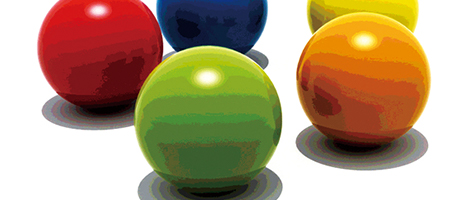
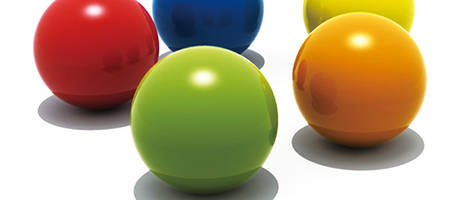
- Limited Bit Depth: Most WLED (Standard) monitors are 8-bit while higher end monitors are 10-bit. What are the practical implications? Challenging images like gradients or skies are more likely to show banding in 8-bits.
(Source: Eizo)
- No HDR Support: Since typical peak brightness for WLED (Standard) displays is ~350 NITs, they cannot be used for HDR work.
- Weak Contrast: The weak contrast is related to lower peak brightness mentioned above.
- Poor Uniformity/Drift: These displays are generally less expensive than higher end monitors and use lower quality backlights, loose manufacturing tolerances, etc. This results in lower uniformity across the screen as well as more drift between calibrations.
Even though very popular, this technology is generally not so suitable for high end work.
3. QLED (Quantum Dot LED)
While still a relatively small part of the overall computer monitor market, QLED is growing quickly and is increasingly common with higher-end monitors. It is a color enhancement technology that takes a standard LED backlight technology and adds a Quantum Dot film. This enables QLED to achieve the following:
- Enhanced Color Gamut: Often around 99% of AdobeRGB)
- Better Peak Luminance: Brighter whites more suitable for HDR
- Better color purity: less bleed due to the nature of the QLED film
- Better energy efficiency: QLEDs are 10-20% more efficient than standard WLEDs, though this advantage goes up when you drive the monitor at HDR-like luminances (600+ NITS)
QLED is more expensive than standard LED and so has been more widely adopted on larger (and more expensive) TVs. Still, this is a solid choice for a high end computer monitor, and this is the type of monitor used by many TruHu users, who need color accuracy.
4. Mini-LED
MiniLEDs is a backlighting technology that uses thousands of tiny LEDs for backlighting. This array of LEDs allows for local dimming and improved contrast. Can achieve very high luminance (1000-2000) NITS suitable for HDR.
This is still a niche segment of the monitor market, because of the expense of this technology. Apple’s Pro Display XDR (~$5000) accounts for a significant chunk of mini-LED sales.
5. OLED
OLED (Organic LED) is an entire different display technology from LCD and currently poses the main threat to LCD’s dominance. Instead of using a backlight, it uses self-emitting diodes for each pixel. Without a backlight and liquid crystal layers, OLED is able to achieve true blacks, resulting in a very high (infinite) contrast ratio. For content with a lot of shadow detail, when viewed in a darkened environment, this can be very helpful. It’s also pretty much ubiquitous in SmartPhones because the intense brightness is useful for outdoor applications.
Most OLEDs also use Quantum Dot technology to improve color performance.
OLED Strengths
- True blacks / Infinite contrast ratio: Pixels turn off completely.
- Wide viewing angles: Excellent color accuracy.
- Ultra-thin and flexible form factors: good for hanging or multi-unit display systems
- Uniformity: perfect, with no backlight issues
- Response Time: Excellent (sub-millisecond), better than LED. Good for gaming.
OLED Weaknesses
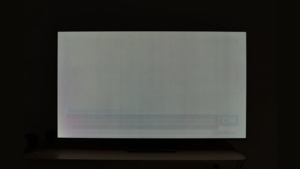
- Burn-in risk: with static content (below is an example of OLED burn-in for someone who watched too much CNN).
- More expensive: 2-3x the cost of comparably-sized WLED monitors
- Lower peak brightness: than Mini-LED (though improving).
- Durability: Don’t generally last as long as LEDs
- More Energy Use: OLEDs are relatively efficient at low luminance and mostly dark content, since the WLED’s backlight is on but the OLED only turns on the needed pixels. Conversely, they are less efficient than WLEDs at typical office luminances (~200 NITS) with mostly white content (Word docs, web pages, etc.).
What Does the Future Hold?
In terms of panel types – TN is rapidly losing market share and will essentially disappear over the next 5 years. IPS is dominant today and will continue to expand until which time OLED becomes a serious threat. VA will remain a niche technology for large curved displays where IPS is challenged.
At the moment, both QLED and Min-LED have only captured a relatively small percentage of the market for computer monitors. As these technologies improve, and the costs come down, expect their market share to expand in high-end and mid-range.
Likewise, OLED will continue to gain ground, particularly in creative environments that cater to HDR. If burn-in issues can be reduced, that will help, too.
Micro-LED is a cutting edge technology that may start getting some adoption on the desktop in the next 5-10 years. It sort of combines the best of OLED and QLED with both great contrast and large color gamut. But it is currently quite expensive to manufacture and is only found in luxury displays like TV walls.
Summary
We’ve come a long way, baby. From heavy, clunky, luminance-challenged, energy-hungry CRTs to today’s cutting edge QLED and OLED monitors.
WLED/LCD is currently the dominant technology for computer monitors, though QLED is currently making significant inroads for higher-end applications like photography, design, video editing, gaming.
It appears WLED will remain dominant for the near term, with Micro-LED or OLED in a position to grab market share if they can bring down the cost and overcome technical limitations.